The humble-brag blocker for your professional feed.
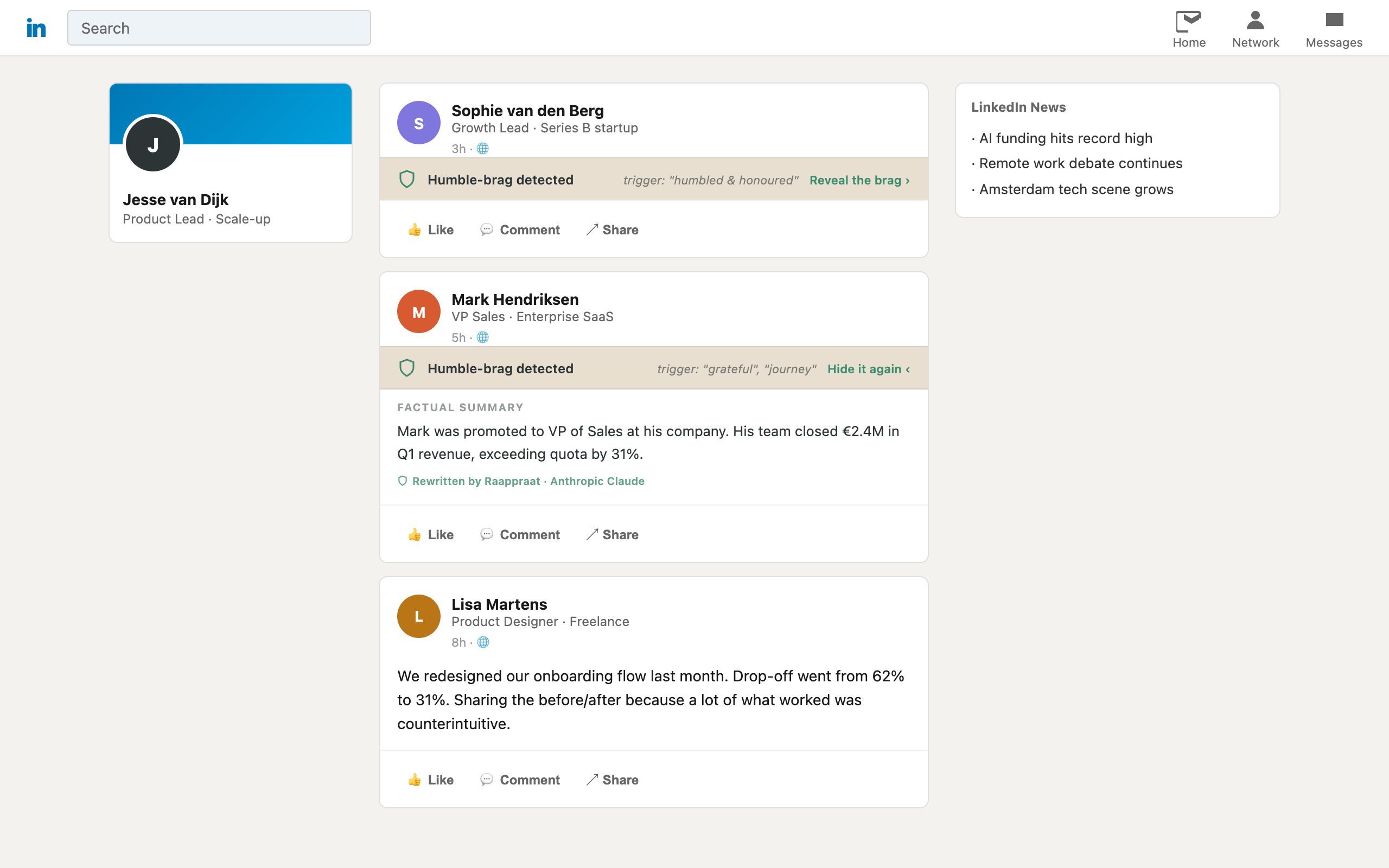
Raappraat silences the "incredibly humbled and honoured" posts before they reach your eyes, and — if you bring your own AI key — rewrites each one into the plain facts it was hiding. I built a thing that silences posts like this one.
How it works
Raappraat scans your feed for the trigger words you configure. When a post matches, it is quietly replaced with a "Humble-brag detected" bar — one click reveals the original if you must.
Connect your own AI key and it goes further: each brag gets rewritten into a short, factual summary. No performative gratitude, no emotional journey — just what actually happened.
Bring your own AI key
Raappraat doesn't sell you AI. Supply a key from any supported provider — Anthropic, OpenAI, Google, Mistral, Groq, or a local Ollama instance — and you pay your provider directly. Your key and your data never touch a Raappraat server, because there isn't one. No key? Posts are still silenced; you just skip the rewrite.
Setting up your AI key
Raappraat works without a key — posts still get silenced. A key only adds the rewrite.
Pick a provider, create a key, paste it into Raappraat's settings. The extension shows you where to get one and what it should look like. Your key is stored on your machine and sent only to the provider you chose.
| Provider | Where to get a key | Notes |
|---|---|---|
| Anthropic | console.anthropic.com | Claude Haiku is the cheap default |
| OpenAI | platform.openai.com/api-keys | GPT-5.4 Nano by default |
| aistudio.google.com/apikey | Gemini Flash-Lite; has a free tier | |
| Mistral | console.mistral.ai/api-keys | European provider |
| Groq | console.groq.com/keys | Fastest; runs open models |
| Ollama | No key needed | Runs on your own machine, free |
Rewrites are short, so the cheap default model on any provider costs a fraction of a cent per post. If you want to try it for nothing, Google's free tier or Ollama are the two routes.
Running it locally with Ollama
Ollama runs the
model on your own computer — no key, no account, no per-post cost, and nothing leaves your
machine. Install Ollama, pull a model (ollama pull llama3.2), and
Raappraat finds your installed models automatically.
One catch: Ollama blocks browser extensions until you allow them, which is a one-time change.
Raappraat's settings page walks you through it for macOS, Windows, and Linux — including
the bit that catches people out, that the macOS menu-bar app ignores the setting and you need to
run ollama serve yourself.